

You have many good tl;dv alternatives if you want a smooth meeting transcription app in 2025. Tools like Fathom, Fireflies.ai, and Otter.ai are known for smart features and high user ratings. More teams work from home now and have up to 15 meetings each week. Meeting transcription software is very important so you do not miss key info. Look at this chart to see how the top alternatives compare:
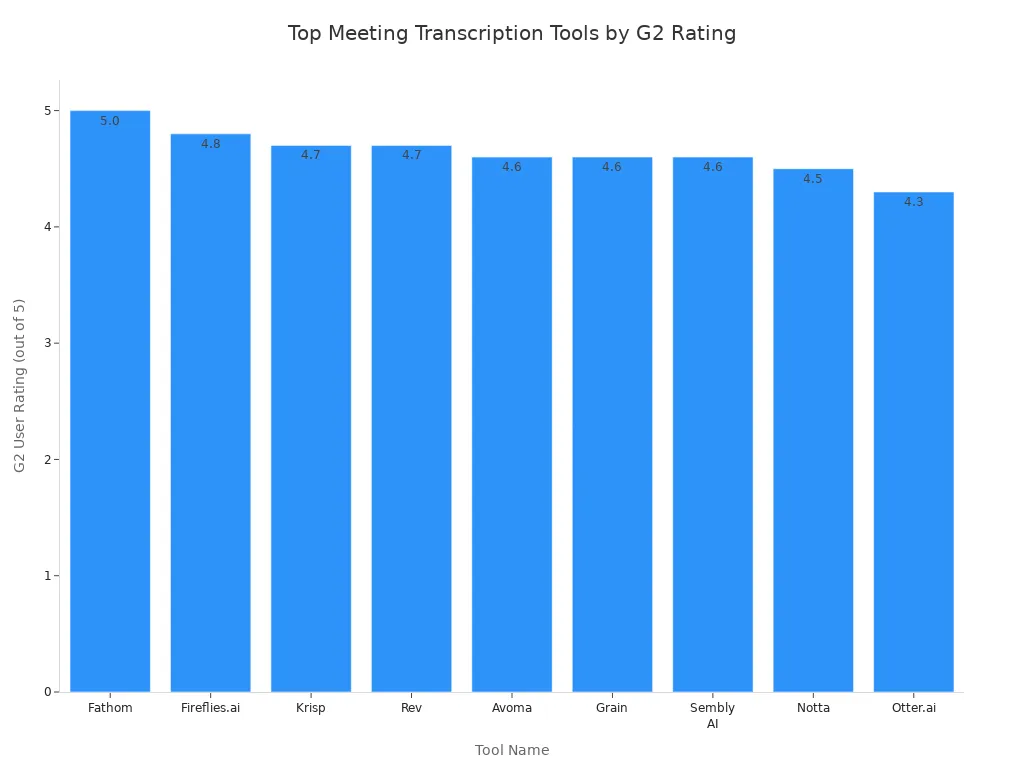
When you check each alternative, think about what your team really needs from a meeting transcription app.
Key Takeaways
Many people want tl;dv alternatives for better features. They also want to use them offline and connect with more apps. - The best options like Fathom, Fireflies.ai, and Otter.ai give real-time transcription. They also use AI to make summaries and work with many languages. - Picking the right transcription tool depends on your team size. It also depends on your budget and what you need, like security or language help. - Free plans are good for small teams. Paid plans give more features and more transcription time for bigger groups. - Try free trials and read reviews to find the best app. This helps your team stay organized and makes your work easier.
Why Look for tl;dv Alternatives?
A lot of people look for tl;dv alternatives. They want meeting transcription to be easier or have more features. Let’s see what makes tl;dv less helpful and why you might want something else.
Limitations of tl;dv
tl;dv has some good AI tools and lets you record as much as you want. But it also has some problems. You can’t use it offline. It does not work with every platform. Some other tools let you transcribe offline or connect with more apps.
tl;dv |
Otter |
Notta |
Rev |
Jamie |
|
|---|---|---|---|---|---|
Free Plan Video Recordings |
Unlimited |
Limited |
3-min limit |
Unlimited files |
Unlimited |
Transcription Languages |
40+ |
Multilingual |
30+ |
37 languages |
30+ |
AI Integration & Summaries |
Advanced AI, summaries |
AI summaries |
No AI |
Limited AI |
AI summaries |
Multi-Meeting Intelligence |
Yes |
No |
No |
No |
No |
Sales Coaching Features |
Yes |
No |
No |
No |
No |
Integrations |
5,000+ |
Fewer |
Limited |
Various |
Limited |
Real-Time Transcription |
Yes |
Yes |
No |
Yes |
No |
Offline Transcription |
No |
No |
No |
No |
Yes |
Speaker Recognition |
Yes |
Yes |
Yes |
Yes |
Yes |
Custom Meeting Templates |
Yes |
Yes |
No |
Yes |
No |
Pricing (Starting Paid Plan) |
$18/month |
Varies |
Varies |
$9.99+ |
Free/premium |
Limitations |
No Webex, no revenue intel |
Limited free |
Short duration |
No sales tools |
No bot |
User Pain Points
Many people have trouble with tl;dv when they use it. Here are some things users do not like:
Sometimes the note-taker bot does not join meetings. This means you miss out on the transcription.
The free version only lets you record and save a little. You have to pay for more.
If someone talks fast or has a strong accent, the transcription is not always right. You need to fix the text.
The summaries can get mixed up about who said what. This makes meetings hard to follow.
The app can be hard to use, especially for teams.
Some people worry about privacy. The bot joins meetings and saves data in the US.
There is no mobile app. You can’t use it on your phone.
You won’t find special features like revenue intelligence or smart action tracking.
Tip: If you want better transcription, teamwork, or more features, try other options. Many tl;dv alternatives fix these problems and help you get more from meetings.
Comparison Table

Key Features
You want a transcription tool that does more than just transcribe your meeting. The best tl;dv alternatives in 2025 help you record and transcribe meetings, create transcripts in real-time, and support many languages. Some tools let you edit videos, highlight key moments, and even host your meeting recordings. You can find AI-powered transcription features in almost every top tool. For example, Bluedot lets you record and transcribe meetings without a bot, which keeps things private. Notta supports over 100 languages and has a built-in screen recorder. Fireflies gives you smart search filters and can transcribe meetings in 70 languages. Fathom stands out with real-time highlights and CRM integration, but it only works with Zoom.
Here’s a quick look at how these tools compare:
Tool |
AI Transcription |
Multilingual |
Meeting Recording |
Video Editing |
Integrations |
Real-Time Transcription |
Highlights |
Bot Required |
Pricing (per user/month) |
|---|---|---|---|---|---|---|---|---|---|
Bluedot |
Yes |
Yes |
Yes |
Yes |
Slack, Salesforce |
Yes |
Yes |
No |
|
Notta |
Yes |
Yes |
Yes |
No |
Google Drive, Slack |
Yes |
No |
Yes |
$13.99 |
Grain |
Yes |
Yes |
Yes |
Yes |
Slack, Notion |
Yes |
Yes |
Yes |
$15 |
Airgram |
Yes |
Yes |
Yes |
No |
Google Calendar |
Yes |
Yes |
Yes |
$18 |
Otter |
Yes |
Yes |
Yes |
No |
Zoom, Google Meet |
Yes |
Yes |
Yes |
$16.99 |
Fireflies |
Yes |
Yes |
No |
No |
Slack, Salesforce |
Yes |
Yes |
Yes |
$18 |
Fathom |
Yes |
Yes |
Yes |
Yes |
Zoom, Hubspot |
Yes |
Yes |
Yes |
$32 |
You can see that most tools let you record and transcribe meetings, offer real-time transcription, and create transcripts with highlights. Some even let you edit your meeting recording or host videos.
Use Cases and Pricing
You might need a transcription tool for hiring, sales, consulting, or banking. Many teams use these tools to transcribe interviews, record and transcribe client calls, or create transcripts for compliance. For example, recruiters use AI-powered transcription to get fast candidate insights. Sales teams use transcripts to follow up with clients and update their CRM. Consulting agencies turn meeting transcripts into reports.
Pricing changes based on your team size and needs. tl;dv offers a free plan and a Pro plan at $25 per user per month. Fathom gives you a free forever plan for individuals and a $19 per user per month plan for teams. Fireflies starts free and goes up to $228 per year. Avoma has more options, from free to $149 per user per month for enterprise features.
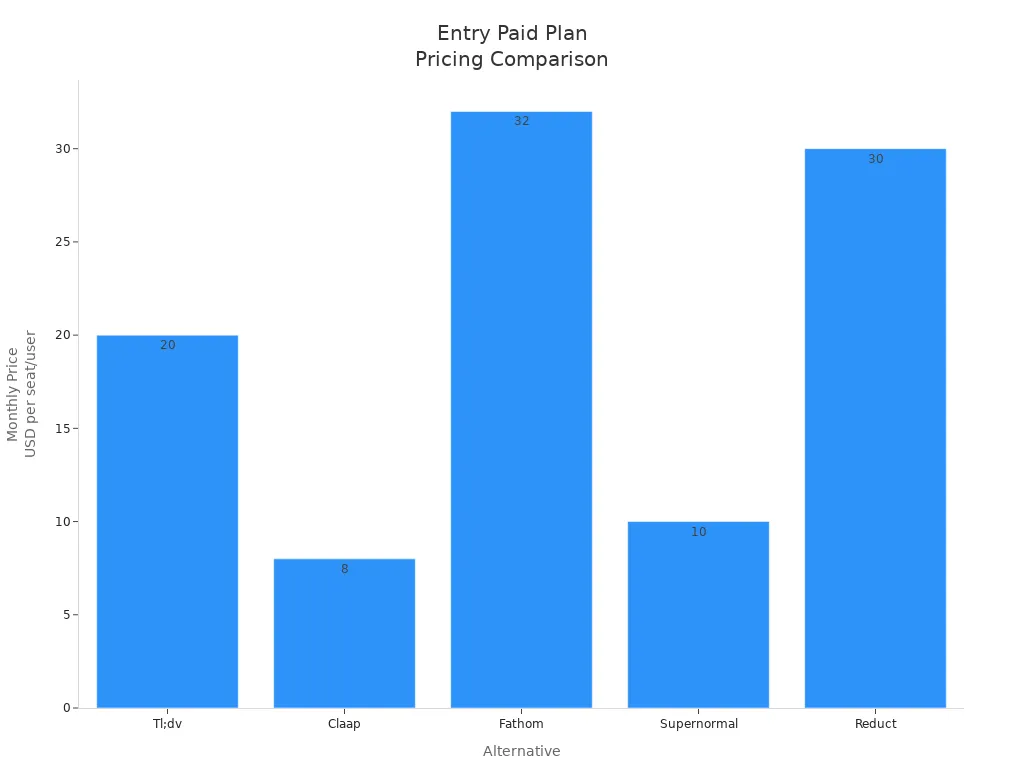
If you want to transcribe meetings for a small team, you can start with a free plan. Bigger teams or those needing advanced transcription features should look at paid plans. Most tools let you record and transcribe meetings, create transcripts in real-time, and support integrations with your favorite apps.
Top 10 tl;dv Alternatives

Fathom
Fathom is a meeting transcription app that is easy to use. It gives you real-time transcription and meeting summaries. You also get AI-powered notes for your meetings. Fathom works with Zoom and lets you share highlights fast. You can give tasks to people in the app. You can also edit recordings and link to your CRM. Fathom has SAML-based SSO for better safety. The free plan lets you record and transcribe as much as you want. This is more than what tl;dv’s free plan gives. Paid plans start at $15 each month for every user. Fathom’s G2 rating is higher than tl;dv.
Fathom Availability |
tl;dv Availability |
|
|---|---|---|
Task Assignment |
Available (Premium plan only) |
Not available |
Recording Editing |
Available |
Not available |
CRM Integrations |
Available on all plans |
Available only on Pro plan |
SAML-based SSO |
Available on Team plan |
Available only on Enterprise plan |
Real-time Transcription with Highlight Sharing |
Available |
Not specified |
G2 Rating |
Higher (5.0) |
Lower (4.8) |
Fathom helps you transcribe meetings and share meeting notes with your team. If you want more features and better prices, Fathom is a good tl;dv alternative.
Fireflies.ai
Fireflies.ai is a strong tool for teams who need to transcribe meetings. You can record and transcribe meetings on Zoom, Google Meet, Skype, and more. Fireflies.ai supports 116 languages and uses AI for transcription. It gives you over 95% accuracy. You can download transcripts in many formats. You get smart search, custom vocabulary, and an AI meeting assistant called AskFred. Fireflies.ai keeps your data private and safe. There is a free plan with 800 minutes. Paid plans start at $19 per user each month.
Details |
|
|---|---|
Transcript Formats |
PDF, DOCX, SRT, CSV, JSON |
AI Super Summaries |
Custom summaries with keywords, action items, and meeting overview |
Custom Vocabulary |
Add your own words and meanings |
Integrations |
40+ apps like Zoom, HubSpot, Slack, Notion, Freshsales, Pipedrive, API, Zapier |
Smart Search |
Search long transcripts easily |
Meeting Organization |
Fireflies Channels help you organize meetings |
Chrome Extension |
Capture Google Meet sessions without a bot |
AI Assistant (AskFred) |
GPT-4 chatbot for meeting questions and content creation |
Private Storage |
Keeps your organization’s data separate |
Security Compliance |
SOC 2 Type 2, HIPAA, GDPR compliant; encrypted data |
Data Privacy |
Zero-day data retention; does not use your data for AI training by default |
Fireflies.ai is a top tl;dv alternative because it supports many languages and gives smart meeting notes. You get real-time transcriptions and high accuracy. Fireflies.ai is great if you want automatic transcription and fast summaries.
Otter.ai
Otter.ai is a well-known app for meeting transcription. It helps you transcribe meetings and make transcripts in real time. You can use Otter.ai with Zoom, Google Meet, and Microsoft Teams. Otter.ai works with English, French, and Spanish. You have to pick the language yourself. You get real-time transcription, custom vocabulary, and speaker names. Otter.ai connects with Slack, Google Docs, and Salesforce. Free plans give you 300 minutes each month. Paid plans start at $16.99 per user each month.
Integration Features |
|
|---|---|
Zoom |
Joins meetings, records audio, transcribes live, writes notes, saves slides, makes summaries |
Google Meet |
Joins meetings, records audio, transcribes live, writes notes, saves slides, makes summaries |
Microsoft Teams |
Joins meetings, records audio, transcribes live, writes notes, saves slides, makes summaries |
Slack |
Shares updates with your team in real time |
Google Docs |
Sends transcripts and meeting summaries |
Salesforce |
Sends sales insights and call notes automatically |
Otter.ai is a good choice if you want real-time transcription and easy connections. But tl;dv has better support for more languages and can detect languages by itself.
Grain
Grain is a meeting transcription app that gives real-time transcription and video insights. You can record and transcribe meetings on Zoom, Google Meet, and Microsoft Teams. Grain lets you remove filler words and add your own vocabulary. You can edit recordings too. You get meeting summaries and can share video highlights right away. Grain supports over 20 languages and has a free version with limited transcriptions.
Feature |
Grain (Competitive) |
tl;dv (Comparison) |
|---|---|---|
Real-time transcription |
Yes, for Zoom calls |
No real-time transcription |
Filler word removal |
Yes |
No filler word removal |
Custom vocabulary |
Yes |
Not available yet |
Recording editing |
Yes |
No recording editing |
Number of integrations |
Limited (7 integrations) |
More integrations |
Translations |
Over 20 languages |
Over 40 languages |
Free meeting transcriptions |
Limited (20 meetings free) |
Unlimited free transcriptions |
Grain is a good tl;dv alternative for people who want real-time transcription, video editing, and quick meeting summaries. You can transcribe meetings and get transcripts fast.
MeetGeek.ai
MeetGeek.ai is a meeting transcription app for both online and in-person meetings. You can use the mobile app to record, transcribe, and review meetings anywhere. MeetGeek.ai supports over 50 languages and gives AI meeting notes and summaries. You can upload recordings from any device and get transcripts and summaries. MeetGeek.ai connects with over 2000 apps, including Zapier.
You can record in-person meetings with the mobile app on iPhone or Android.
The app supports transcription in over 30 languages and gives accurate transcripts and summaries.
MeetGeek.ai finds the spoken language and makes transcripts and summaries for teams everywhere.
MeetGeek.ai is a good tl;dv alternative if you need to transcribe offline meetings and want lots of integration choices.
Avoma
Avoma is a meeting transcription app made for sales and revenue teams. You can record and transcribe meetings on many platforms like Zoom, Google Meet, and Microsoft Teams. Avoma gives revenue intelligence, real-time transcription, and AI meeting notes. You get meeting summaries, deal intelligence, and analytics to help you work better.
Avoma |
tl;dv |
|
|---|---|---|
Revenue Intelligence |
Gives deal risk management, reminders, and notifications |
Not available |
Real-time Transcription |
Yes |
No |
Video Platform Integrations |
Many platforms supported |
Limited |
Free Plan Limitations |
Limited transcription minutes |
More generous free plan |
Language Support |
30 languages |
About 40 languages |
Avoma uses topic detection, AI notes, and dashboards to help you see important meeting details.
You get team note editing, live bookmarks, and playlists for training.
Avoma is a top tl;dv alternative for sales teams who want automatic transcription and smart analytics.
Fellow.app
Fellow.app is a meeting transcription app that helps you organize meetings and take notes. You can record and transcribe meetings, make summaries, and share AI meeting notes with your team. Fellow.app connects with Google Meet, Zoom, and Microsoft Teams. You get templates for different meetings and can work on notes together in real time.
Fellow.app gives meeting insights and summaries to help your team work better.
You can use the app to transcribe meetings and make accurate transcripts for every talk.
Fellow.app is a good tl;dv alternative if you want a simple app and strong teamwork features.
Notta
Notta is a meeting transcription app that supports over 100 languages and gives real-time transcription. You can record and transcribe meetings, make transcripts, and use the built-in screen recorder. Notta connects with Google Drive, Slack, and other tools. You get AI meeting notes and summaries for every call.
Notta lets you transcribe meetings and make accurate transcripts in real time.
You can use Notta for interviews, client calls, and team meetings.
Notta is a strong tl;dv alternative for teams who need speech-to-text transcription and flexible connections.
Jamie AI
Jamie AI is a meeting transcription app that focuses on AI meeting notes and automatic transcription. You can record and transcribe meetings, get summaries, and use AI meeting assistant features. Jamie AI supports over 30 languages and lets you transcribe offline. You get accurate transcripts and fast summaries for every meeting.
Jamie AI is a good tl;dv alternative if you want offline transcription and AI meeting notes.
You can use Jamie AI to transcribe meetings and make transcripts for your team.
Tactiq
Tactiq is a meeting transcription app that helps you record and transcribe meetings on Zoom, Google Meet, and Microsoft Teams. You get real-time transcription, meeting summaries, and AI meeting notes. Tactiq connects with Slack, Notion, and other tools. You can highlight important moments and share transcripts with your team.
Tactiq is a good tl;dv alternative for teams who want real-time transcription and easy sharing.
You can use Tactiq to transcribe meetings, make transcripts, and help your team work better.
If you want to transcribe meetings, make accurate transcripts, and get AI meeting notes, these tl;dv alternatives have strong features for every team. You can pick the meeting transcription app that fits your work, budget, and language needs.
Choosing Meeting Transcription Software
Team Size and Needs
Think about your team before picking meeting transcription software. Is your group small or is it a big company? Big teams with many meetings need a tool that works fast. Otter.ai is good for large teams because it can handle lots of meetings and gives real-time transcripts. Small teams or new companies may want a cheaper tool like Rev. Rev lets you transcribe meetings without spending too much money. Here are some things to check:
Good audio quality helps the software make better transcripts.
Speaker identification makes it easier to know who is talking.
Connecting with Zoom or other tools saves you time.
Multilingual support is important if your team speaks more than English.
Pick a price that matches your budget and what you need.
Tip: See if the software has a free trial. You can test how well it transcribes meetings before you choose.
Industry Requirements
Your job field can change what you need from transcription software. Some jobs need extra safety or special features. Look at this table to see which tools fit different jobs:
Software |
Best For |
Key Features |
Pricing Model |
|---|---|---|---|
GoTranscript |
Legal, medical, technical teams |
Human-powered, 99% accuracy, handles accents |
Per-minute, no real-time |
Rev |
Client meetings, interviews |
Hybrid AI + human, integrations, editor |
Pay-per-minute |
Sonix |
Global agencies |
40+ languages, subtitle generation |
Subscription or pay-as-you-go |
If you work in finance or healthcare, you need strong safety and rules. Some teams want almost perfect transcripts, so human-powered transcription is best.
Feature Priorities
Think about which features are most important for your meetings. Do you need real-time transcription or speaker labels? If you do interviews, you may want word-for-word transcripts. For brainstorming, meeting summaries help you remember ideas. Connecting with your favorite apps can make meetings better. Always check if the software can transcribe in many languages and highlight key points.
Budget Considerations
Money is important when you pick a tool. Free plans are good for small teams with few meetings. If you need more features or lots of transcripts, paid plans give you more. Compare prices—some charge per minute, others by user each month. Ask yourself:
What features do you need most?
How many meetings do you transcribe each month?
Does the software fit your budget and team size?
Note: Try a free trial first. You can see if the software makes good transcripts for your team.
You have lots of options if you want a tl;dv alternative. Look at this table to find which one works for you:
Scenario |
Best Alternative |
|---|---|
Fathom, Otter |
|
Multilingual Teams |
Votars |
Advanced Analytics |
Gong, Avoma |
Try a demo or free trial first. See how well the transcription works. Make sure it connects with your other apps. Read what other people say in reviews. Choose the one that fits your work and budget.
FAQ
What is the best free transcription tool for small teams?
You can try Fathom or Otter.ai. Both offer free plans with solid features. You get real-time transcripts and easy sharing. These tools help you save money while keeping your notes organized.
Can I use these transcription apps on my phone?
Yes, many apps like MeetGeek.ai and Notta have mobile versions. You can record and transcribe on your phone. This makes it easy to capture conversations anywhere.
Do these tools support different languages?
Most top transcription apps support many languages. Notta and Fireflies.ai work with over 100 languages. You can switch languages in the settings and get accurate transcripts.
Are my recordings safe with these apps?
You get strong security with most transcription tools. Fireflies.ai and Avoma use encryption and follow privacy rules. Your data stays private and protected.
How do I choose the right transcription software?
Think about your team size, budget, and what features you need. Try free trials to see which app fits your workflow. Read reviews and ask your team for feedback.


0 comments